So you want to find out the software version of a Ziton ZP3 Panel? Just follow these easy steps…
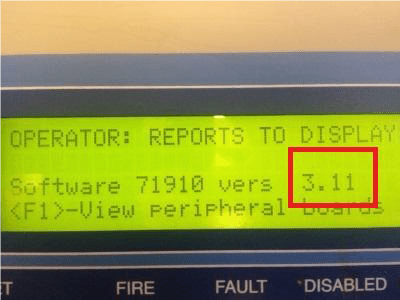
Why do you need to find out the software version of a Ziton ZP3 panel?
There are various reasons why you would need to find out. For instance, you need to know this information so you can upload/download to the Ziton ZP3 panel from the Planner software on a laptop.
You also need to find out the software of a Ziton ZP3 panel so you can find out what devices are compatible with the panel. An example would be that ZP720-3 heat detectors are not compatible with ZP3 panels are below software version 3.00 (e.g they would not be compatible with software version 2.09 panels).
How to find out the software version of a Ziton ZP3 Panel
- Press the menu key on the keypad
- Enter ‘Operator’ by pressing number 1
- If prompted, enter the code (default code is 2000) and press enter
- Enter ‘Reports To Display’ by pressing number 2
- Enter ‘Software Version’ by pressing number 2
Watch the how to video
It really is that easy to find out the software version of a Ziton ZP3 panel! You can also watch our free tutorial ‘how to’ video:
Ziton ZP3 Training
Ziton ZP3 systems can be daunting to maintain with no training or experience. That is why fire4u.co.uk offer a one day basic Ziton ZP3 training course.
This can either take place at the Ziton training centre in Milton Keynes, or we will travel to your place of work.
The training has been designed for maintenance and small works on a ZP3 system, as well as training on how to use the Planner software on a laptop.
Planner software and one RS232 lead is FREE with the training
For more information either click here, email via the contact form (below), or call us on 0345 548 7025


 Free Ziton ZP3 help & Advice